Please Click This Before Reading :D

Showing posts with label App Review. Show all posts

Friday, April 26, 2013

Solitaire Blitz

Whoo~ Finally, another Application review! It's been a while since my Dragon Story™ one, after all :) 

So anyways, from:
We have: 

Solitaire Blitz
(click on the pictures to enlarge them)


Technically, this is what you're supposed to see when you click on the App icon. Nothing fancy, just a "Solitaire Blitz" logo and a pirate starfish rolling its way to the other side of the loading bar -.-


The above picture on the left is what you'll see at the end of the game, actually. The thing is, that was the first picture I took when the App opened so... 

:P

Anyways, the bottom picture is one where you get to select "boosts" in exchange for the silver you collect at the end of the game. You can choose a maximum of 3 boosts from the four that you are offered.

I'll get to how that works later.
As you can see from the top left picture, the standard time you get is 90 seconds

The deck opens with a card. The objective of this game is to finish up the cards on the bottom half of the top left pic by clicking on cards which come before/after it and so on.

For example, with the "J" that you see in the top left picture, you can click on "10", then "9", then "8" and then "7".

Once you no longer have any other cards which come before or after that card, then you draw a new card from the deck. When you've completed all that, you'll see the picture on the top right (without the "3-game streak", of course. That was me :P)

The two bottom pictures are your "rewards". Each denotes a certain amount of silver ranging from $5 to $3000 and above. These are the silver that you use to buy "boosts"

The one with Extra Time gives you extra time (mostly half a minute extra).

The Starting Joker allows you to draw any card from your deck as a starting card.

The Bonus Fish gives you a bonus (duh).

And the Key Magnet allows all the "keys" to appear in your starting deck. If you collect all the keys, you are able to unlock more decks so you may finish the game faster.

That's pretty much it for this game. It's more of a speed game because it tests your mind to see if you know which card comes before/after which card

It gets more and more fun as you get the hang of which card to put forth :)

This game is compatible with the iPhone (from 3GS+), iPod Touch (3rd Gen+), and the iPad series (goes for the Mini as well), although the App is generally optimized for the iPhone 5. It requires the iOS 4.3 or later and is rated 4+.

All in all:

5/5 for Artwork.
I love the cute little mermaid that comes to "bestow" your rewards unto you :P Beautiful graphics and adorable animations that help make this a more enjoyable game. Blue-themed as well, so it's easy on the eyes, rather than a nauseating shade of fuchsia pink -.-

3/5 for Gameplay.
I'm giving this a medium rating because you don't really enjoy this game unless you know exactly how to play it. I've been playing Solitaire for so long that it's natural for me to know what comes after what card so for me it's fun :) 

However, if you don't mind playing like a noob then you'll find this game quite challenging :)

5/5 for Items.
One word = Fantastic.

For one, I don't have to use any money at all in this game, although there are in-app purchases available. That's because every time I play, I get more and more silver which I can use to purchase all those boosts. You literally spend no money at all playing this game.

Which is, once again, fantastic.

To sum it all up, this game is free and addictive, although there is only one tiny annoying bit about it. That would be the fact that you can only play it five times at one go. It's got that stupid "energy" thing which takes 10 minutes to earn -.-

I'm not sure if this is available for Android phones, but you can find out more about this App here!! 

That's about it, then :) CIAO!!

P/S: Please CLICK ON MY NUFFNANG ads :) Thanks!!

Friday, March 22, 2013

Dragon Story™

Okay, so I've decided to start reviewing applications again. So, from Team Lava, this is:

Dragon Story
(click on the pictures to enlarge them)


Technically, this is what you'll see when you first click on the application. After it loads, you may begin the whole business of starting your own little dragon farm :)

Okay, so the top left picture has the "Market" options, which is on the bottom left of the game screen. 

It technically features all the featured products (like rare dragons), the normal dragons, habitats (for your dragons), buildings (like your farm), decor (for decorations, duh) and expand (to expand your farm).

Be warned that with every expansion, it gets more expensive O.O

The top right, bottom left and bottom right pictures are all pictures of dragons that you can buy either with coins or gold (which is limited unless you buy with actual currency -.-)

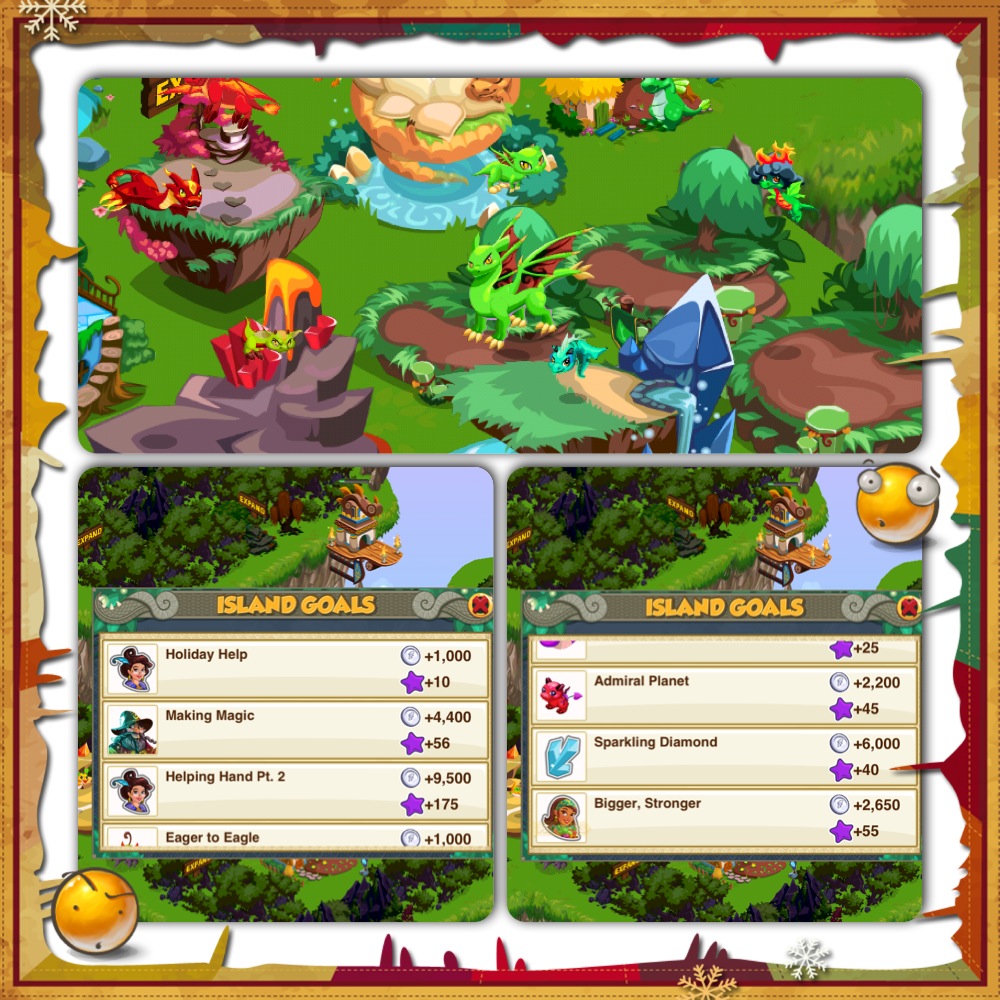
Okay, so the top huge-ass picture is a screenshot of dragons in their habitats. The most cheap to procure is the Fire dragon, with the Leaf dragon next in line, followed by the Water dragon. 

The two pictures below represent the Island Goals. These are goals that you are supposed to achieve. It can range from being planting certain crops to buying certain dragons.

Either way, some can be done simply enough, but others require actual currency

Being the cheap person that I am, however, I have a few I couldn't accomplish because I couldn't buy the stuff required -.-

Ah~ The top left picture is still a screenshot of Island Goals. Below it is a picture of my "Epic Form" green dragon. It just means it's at its maximum growth and earns the maximum amount of coins it can.

Below that picture is one of my Leaf and Water hybrid dragons, at the process of evolving to a more awesome form :P

The top right picture is one of the annoying advertisements -.-

Below it is a hot-air balloon, also advertising different games in hopes that players will download it too.


And this last picture is one of neighbouring countries. They're all richer than I am (considering the fact that they actually make in-app purchases to make their farm more awesome -.-)

You can gain "social status" by visiting the community and you can earn certain awards by visiting your neighbours (that you invite yourself) so I would highly recommend doing that if you play this game :P
This game is compatible with the iPhone, iPod Touch and iPad as long as the device is of iOS 4.0 or later. It's rated 4+ on the AppStore so it can't be bad, right? I mean, I'm playing it, so...

:P

All in all:

4/5 for Artwork
Lovely graphics and beautiful looking dragons. The only thing stopping me from giving this a perfect rating is the fact that I dislike most of the dragons' Epic forms. Let's just say it's a bit more... stony than their starter forms. That's probably the point, but I prefer a cute dragon to a hard-faced one -.-

4/5 for Gameplay.
By Gameplay, I mean the activities that you can carry out in the game. For example, in DragonVale, I get to send my dragons for some Olympic games for them to win prizes. Well, in Dragon Story, I get to send my dragons on Quests so that I rope in whatever prizes they award for the particular quest (e.g. To get crops or coins).

2/5 for Items.
I mean, not to say that I'm really that cheap or anything, but seriously? I can't get a Magic Dragon unless I buy one. Now the only thing I'm counting on is sending my dragons on "Crafting Gemstones" Quests so that I get a purple gemstone so as to create Magic Dragons -.-

Yeah, so this game is pretty good for a free one. I mean, you have the stupid in-app purchases but hey, if you can get by without them then why not, right?

This is available even for Android phones, so for those without iDevices, why don't you give it a try? To find out more, click here.

:)

That's about it, then. CIAO!!

P/S: Please click on my Nuffnang ads :) Thanks!!

Sunday, August 12, 2012

Alice's Teacup Madness FREE

From the developers of the Dash series (Hotel Dash, Diner Dash, Wedding Dash etc.) and their second latest - Avenue Flo, PlayFirst has come up with...

Alice's Teacup Madness!
(Click on the pictures to enlarge them)


Long story short, a girl named Alice follows a curious-looking bunny, falls into a hole and ends up in a completely different universe.

The only difference between the original and the one here is that the bunny actually stops and helps her. Apparently, the only way to get back is to earn enough money and get out. 

The bunny then helps her by setting up a cafe and teaches her how to run it.

From here on out, it's pretty much the same as the Dash series with the serving of customers and all that :)


The first box is the loading thingymajingy. The second box (top) shows how much your goal is for the tutorial section as well as the expert goal

The bottom box is a screenshot of the tutorial. If you're new to how PlayFirst does their magic, then you'd probably need to go through it :)


It's still the tutorial thingy here. My advice is, be patient. The "Alice" now moves a little slower than Flo does in her other games but it gets better.


Still the tutorial here because this game series requires the usage of toppings (as you can deduce from the strawberry *or is it apple?* topping). 

In the first level, you only go through with a single-flavoured tea and a single-shaped-mold pastry. When you get to other levels, you access other shapes and different coloured teas.


We're nearing the end of the tutorial already :) 

Pretty much the same concept as Diner Dash and other Dash games - you get more points if you seat the characters where the colours match.

The Hatter was supposed to come next but I didn't want to ruin everything, so... :)

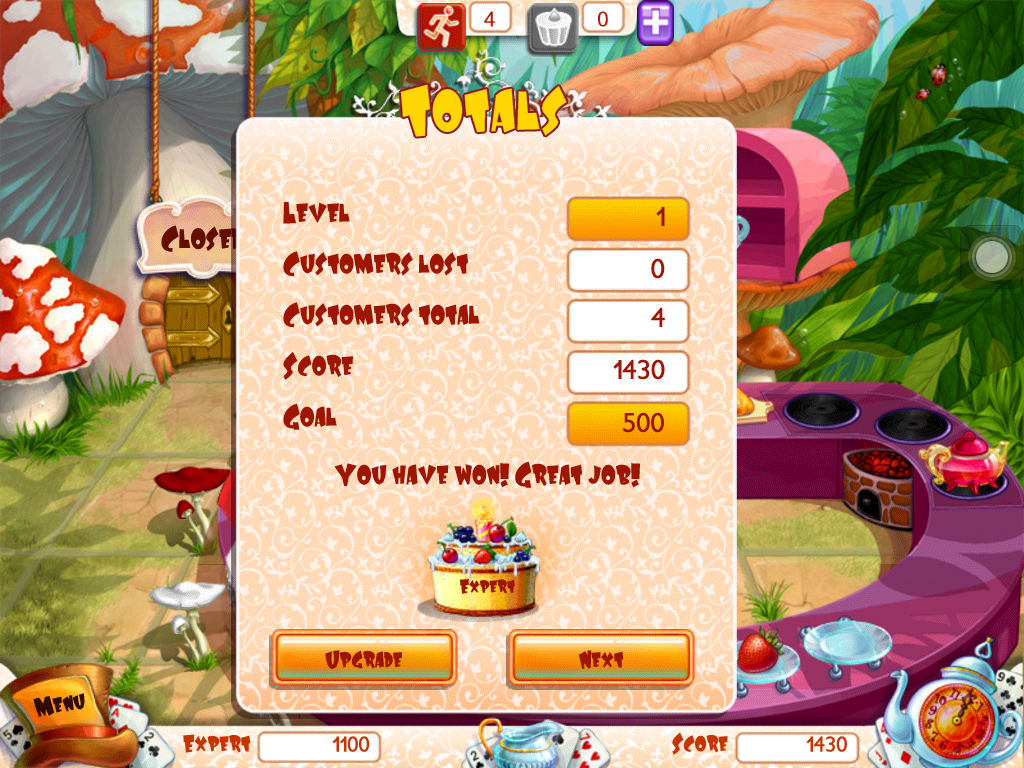
And that concludes the level as well as the tutorial! From this page, you can choose to upgrade straight to the FULL game for $4.99 or choose to continue with the trial first.

In the end, you still have to decide whether or not you want to pay because you only get to level 8 with the free trial. PlayFirst is like that. It's the only reason I hate it :P

All in all:

2/5 for Artwork. I hate the drawing. It's nothing like their previous works or better. It's 3D but the movements and character-drawings are so... -.-

2/5 for Storyline. Nothing interesting like the Dash series. For one, the story itself was based on Alice in Wonderland. They tried to change the ending a little but it didn't spark my interest.

4/5 for Items. I like the fact that you can boost Alice's speed in the middle of the game, albeit for a limited amount of time. It makes it so much easier to serve customers. There's also a "Serve" button for the food to instantly appear in front of their respective order-ers so as to save time. And they also have the usual decorative stuff.

3/5 for Extra Services. There's the guy at around level 6 who starts standing by the door to help you kick unhappy customers out before they leave on their own. Apparently you lose a lot less money by kicking them out the cafe first O.O I rated it 3/5 because I'd rather not let that happen :P

Despite all the low ratings and not-so-high ratings, I'd still get the full version if I have the chance. Even if the drawing's ugly, it doesn't affect the fact that it's an awesome game to play. I love PlayFirst and I'll always be on the look-out for new products.

:)

Find out more about the game here.

That's about it, then. CIAO!!

P/S: Please click on my Nuffnang ads :) Thanks!!

Dragon Wings FREE

Whoo~ Alright, this is a game app review for an iPad application called Dragon Wings. It's free ^.^ (obviously, otherwise I wouldn't have it.)

-.-
Basically, this is what you'll see once you click on the application.

Obviously, you click on "Play". You can choose to play their music in "Options" or decide to listen to your own music via your iTunes playlist. 

"Shop" is where you can purchase more types of dragons of your choice like: Kids Mode, Super Dragon, Rock Dragon, Dragon Girl or power-ups like: Super Fireball or Multiple Fireballs.

"More Games" will direct you to a page where they advertise other free games by the same developers :)

This is how you play the game:
  1. Tap anywhere on the screen to start flying.
  2. Technically you hold your left finger against the screen when you want to stay up and release when you want to go back down.
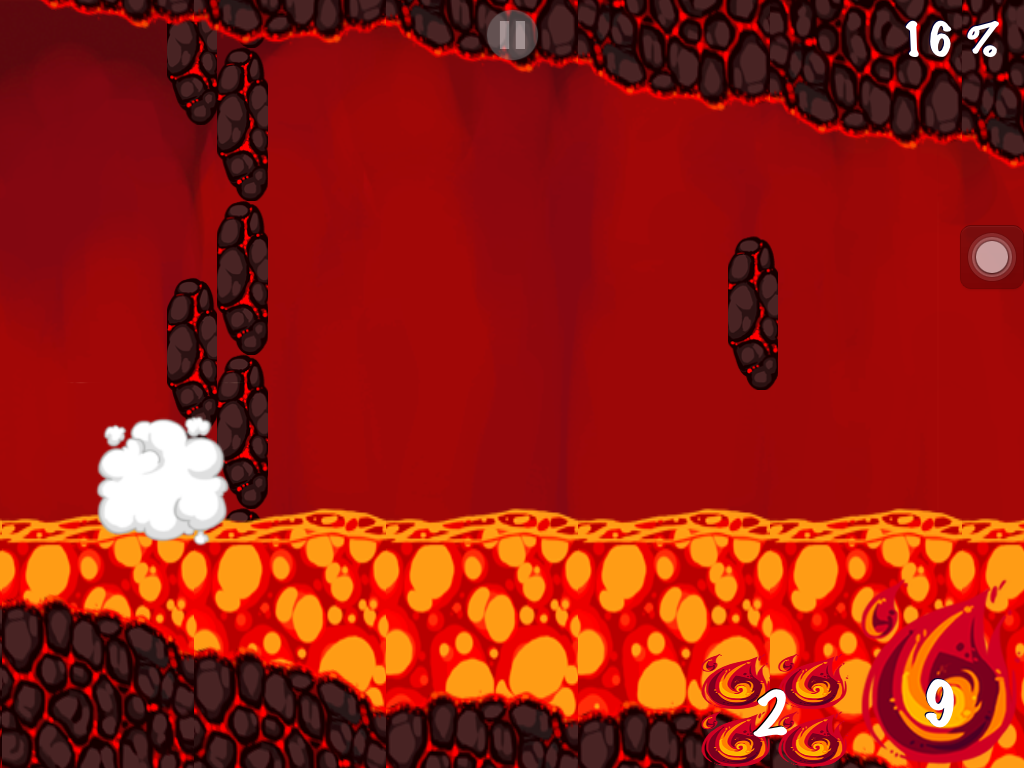
  3. See the "+5"? That adds to how many fireballs you can spit (using your right finger).
  4. The fireball should look something like the fire thingy in the third box.
  5. It's used to get rid of obstacles like in the 4th box
  6. Under NO circumstances are you allowed to "land" or come into contact with the obstacles.
Otherwise:

Well, yeah, you get the picture.

:)

This is compatible with any iDevice like the iPhone, iPod touch and iPad as long as it satisfies the minimum requirement of iOS 4.0 or later.

Click here to visit the Apple website on the app for more details :)

Examples of In-App Purchases include:

  1. Rock Dragon$14.99
  2. Kids Mode$9.99
  3. Super Dragon$6.99
  4. No Ads$0.99
  5. 50 Multiple Fireballs$9.99
  6. Dragon Girl$4.99
  7. 30 Super Fireballs$9.99
  8. 15 Multiple Fireballs$3.99

So, yeah :) Not a bad game, really. I'd rate it 4/5 because it's really addictive and the dragon is so bloody cute. It can get irritating when you can't seem to clear the stage, though -.- But then again, which game isn't irritating that way? 

:P

Happy flying! And remember to CLICK ON MY NUFFNANG ADS!! Please and thank you :)

P/S: Please click on my Nuffnang ads :) Thanks!! (Habit, I guess :P)

Sunday, March 18, 2012

SpellCraft School of Magic


Ola :) This one's a game application review for SpellCraft School of Magic, an app by Appy Entertainment Inc., as I'm sure you've deduced -.- This is a free download in the App Store and is available for both the iPad and the iPhone (under the same name). 

Although this app is free, there are in-app purchases available, but I'll get to that later :)

This is the welcome page. Click on the "Play" button to initiate adventure! -.-

This is the "common room" where you see there's your dorm, the spell library, greenhouse, social, dueling, bestiary and dungeon.

Aha! This is the Spell Library where you fix your own spells.

After choosing which spell you intend to concoct, you may select your required ingredients. Ingredients can either be bought or grown in your greenhouse, by the way.

Ooh~ This is the Bestiary. It's where you keep the animals you found in the dungeon. I only have the cat and the wolf for the time being. The third animal is an owl but obviously, I haven't found that yet.

And this is the Dungeon where you "battle" for coins and lost items like ingredients or accessories that might increase protection against certain types of spells.

And this is where you can fix your settings, whether you want sound or not, whether you want to enable/disable one-tap purchasing (which might help if you keep buying stuff by mistake) or if you want to disable pop-up game ads (in which case you need to upgrade and pay -.-)

And that's about it for SpellCraft School of Magic. I have a lot of fun playing this game. My sister thought I was going crazy when she saw me swirling my finger around the brewing pot to make my spells.

-.-

P/S: Please click on my Nuffnang ads :) Thanks!!

Sketchbook Express

Second app review for the day! I'm on a roll so... :) Anyways, this app is a must-have for anyone who has an affinity for art. On the iPad, the free version is called Sketchbook Express and the one that costs $4.99 is called Sketchbook Pro for iPad. 

For the iPhone, the free version is called Sketchbook MobileX and the $1.99 version is just Sketchbook Mobile.

Since I don't own the paid version, I'll just briefly explain how the free one works, 'kay? :)

This is actually a finished product. I don't have any pictures of an unfinished one, sorry.

The stuff in the rectangle are choices of the brush. You can have the one with an authentic brush effect, one which allows you to draw straight lines, one which allows squares and the last one which allows circles.

This is the range of colour schemes. You can also choose how thick you want your brush to be or if you want to use a single colour to "fill" a particular space. There's also an eraser for your convenience.

This is another finished product. There are tools which let me get that smudgy effect for the sky and the blue patch where she stands. The white clouds and stuff around the blue patch was made by the eraser. Go figure -.-

There's also a tool which switches the orientation of the sketch, as such.

And that's all for Sketchbook Express :)

P/S: Please click on my Nuffnang ads :) Thanks!!

Saturday, March 17, 2012

Air Video

Yo! So I decided to branch out towards reviewing apps as well :) These will be limited to iPad-only apps, of course, since I have no other app-accomodating device except the iPad :P

This app is called Air Video. It's available on both iPad and iPhone devices in the App Store and come in two different versions: the free one and the one that costs $2.99. 

In general, this application allows its user to access MKV video files without having to convert them into .mp4 or .m4v format. Really convenient for those who have either no time to convert the files or are just plain lazy.

In my case it's the latter :P

Anyway, this app requires the user to download the Air Video Server as well, on your desktop. It's Windows- and Mac-friendly so it doesn't matter which you use as long as you have the software. This server is meant to locate whatever files you have in your computer and load the MKV files into your iPad. 

This is how it'll look like once you connect your desktop to your iDevice. If you're using Windows, I think something similar will pop.

After you decide which files you intend to have in your computer, you will see all of 'em on your iDevice. They only go according to folders, however, so if you want to watch anything, you have to compile them into folders then transfer them into the app on your desktop. The Air Video Server icon is located on the top right-hand corner where all the time, day and bluetooth thingymajing is displayed. It's the little film picture with a WiFi icon next to it.

This is what you'll see once you open the folder in which videos you want to watch.

Selecting an episode will allow you the following image. This is me wanting to watch a Shinrei Tantei Yakumo episode. Below the video are two choices: whether you want to play with live conversion or convert the whole video.

The difference between playing with live conversion and converting the whole video is that the former choice does not save a copy of the converted file. Technically, it's a one-time thing with the live conversion. Good thing is, you don't have to wait. 

On the other hand, converting the whole video allows you to watch the converted file and skip whatever parts you don't want to see or the like. Really handy if you're only looking to watch a particular scene.

This is the conversion queue. Once you decide which videos you want to convert, just click the "Convert" button below the video and view the queue by clicking on the "Queue" button on the top right-hand corner of the application.

Once you've converted the file, you can view it :) The converted file will have a small "converted" indication on the bottom right-hand corner of the file :) You won't miss it.

Now, what I mentioned is only for the free version. The bought version will let you see the whole list of episodes, unlike the free version. I'm sure you noticed you can only view 4 episodes at a time? Don't worry. Just keep clicking the "refresh" icon on the top right-hand corner and you'll be able to surf through the other episodes with ease.

And that's all for Air Video :) 

P/S: Please click on my Nuffnang ads :) Thanks!!